Biotopia: A Professional Google Slides Template
The quest for a compelling, modern presentation design can consume valuable time and creative energy. For professionals, entrepreneurs, and creators, this often means sacrificing content development for layout tweaking. The Google Slides - Biotopia template offers a direct solution: a fully-featured, visually-cohesive slide deck designed to streamline the creation process from the first slide to the last.
What Is the Biotopia Environment Template?
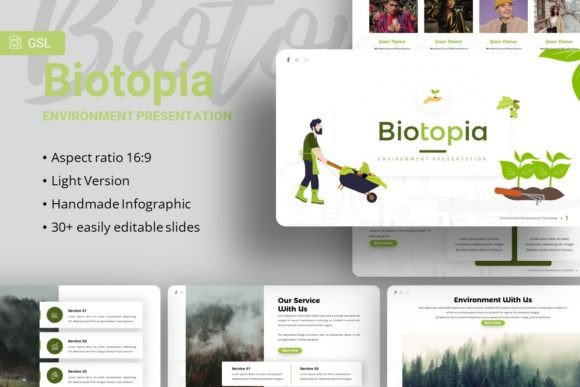
Biotopia is a presentation template built for Google Slides, comprising 35 unique slides. Its core purpose is to provide a robust, aesthetically unified framework. The design embodies a clean, contemporary "environment" feel, utilizing curated typography—Montserrat and Karla fonts—and pixel-perfect illustrations. Crucially, it is not merely a static set of images; every graphic element is resizable and editable, and picture placeholder functionality allows for simple drag-and-drop image insertion. This level of built-in customization means users can adapt the template's visual language to their specific message without breaking its professional aesthetic.
Moving Beyond Generic Design Struggles
Many users start with blank slides or overly basic templates, leading to inconsistent formatting, mismatched colors, and infographics that lack polish. Biotopia addresses this by being based on master slides. This foundational structure ensures that changes to core elements like fonts, color schemes, or background styles propagate throughout the entire deck, guaranteeing visual consistency. For a marketing manager preparing a quarterly review, or a startup founder crafting a pitch deck, this eliminates the risk of a presentation looking piecemeal. Your time is redirected from design troubleshooting to refining your narrative and data.
Practical Benefits for Diverse Professional Needs
The template's advertised versatility for agencies, company profiles, portfolios, and personal use is rooted in its content architecture. Its 35 slides are not random; they include purpose-built layouts for team introductions, data visualization, project timelines, and portfolio showcases. The inclusion of handcrafted infographics in PowerPoint format is particularly valuable. Instead of spending hours constructing a chart or process diagram, you can adapt these pre-made, stylistically coherent graphics. This directly strengthens communication by ensuring complex information is presented clearly and attractively.
Consider a freelance photographer creating a personal portfolio website. Using Biotopia, they can quickly assemble a client presentation or an online slide portfolio that highlights their work with elegance. The picture placeholder system lets them drag and drop their best shots into framed layouts without manual resizing or alignment. The result is a presentation that feels deliberately curated, elevating their professional image without requiring graphic design expertise.
Key Features That Translate to Time Savings
- Easy Customizable Contents: Text boxes, colors, and shapes are designed to be modified intuitively within Google Slides, lowering the technical barrier.
- All Graphics Resizable and Editable: You can tweak an illustration's size, color, or even individual elements to better match your brand, providing flexibility without starting from scratch.
- Documentation and Included Files: The provided documentation file and separate PowerPoint (.PPTX) file offer guidance and an alternative editing environment, supporting users who may prefer to start in PowerPoint before importing to Google Slides.
- Asset Guidance: The note on using image sources like Unsplash, Pixabay, and Pexels for replacing demo images provides a practical pathway for sourcing high-quality, royalty-free photography to personalize the deck.
Understanding the Scope and Best Fit
The Biotopia template is a powerful tool for those who value design consistency and wish to expedite the slide creation process. It is likely most beneficial for individuals and teams who regularly produce client-facing presentations, investor pitches, internal reports, or creative portfolios. The template’s modern, slightly abstract environmental aesthetic may be perfectly suited for creative agencies, tech startups, or sustainability-focused businesses, but its clean base allows it to be tuned for more conservative corporate use as well.
It is important to note the distinction mentioned in the specification: the demo images are for preview only. Users must supply their own imagery. This is a standard practice for premium templates and encourages personalization, but it means your final output depends on your ability to source or create complementary visuals. Furthermore, while the template is highly customizable, it operates within its defined design system. If your brand requires a radically different visual theme—say, a vintage or highly minimalist style—you may find yourself customizing beyond the template's intended scope, which could negate some time-saving benefits. In such cases, comparing this template to others more aligned with your specific aesthetic is advisable.
From Template to Effective Presentation
Simply having a beautiful template does not guarantee an effective presentation. Biotopia provides the stage, but the performance relies on your content. Its value lies in removing the friction of stage-building. For an educator creating a course module, the pre-organized slides for timelines, comparisons, and key points can help structure the lesson logically. For a small business owner presenting a company profile to potential partners, the professional sheen of the template can enhance credibility and aid in conveying stability and attention to detail.
The template’s inclusion of vector icons adds another layer of utility. Icons can be used to quickly create visual anchors for lists, service offerings, or contact slides, improving audience comprehension and retention. This supports the goal of not just informing, but engaging your audience.
Final Observations for Potential Users
The Google Slides - Biotopia template is a thoughtfully constructed design asset. Its primary contribution is efficiency through coherence. It reduces the number of decisions a presenter must make about layout, color harmony, and graphic quality, freeing cognitive resources for the more critical tasks of message crafting and data analysis. It solves a common problem: the disjointed, time-consuming slide design process that often results in a final product that looks less professional than the content it holds.
For the modern professional whose success depends on clear, persuasive communication, tools that streamline output without compromising quality are invaluable. Biotopia serves as such a tool, offering a ready-made visual environment that is adaptable enough for a wide range of stories yet strong enough to tell each one with consistent, contemporary flair. By investing in a foundational template like this, you invest in the future efficiency and impact of your communication, ensuring that every presentation you build starts from a position of strength.