Business Development App Screens for Your Next Project
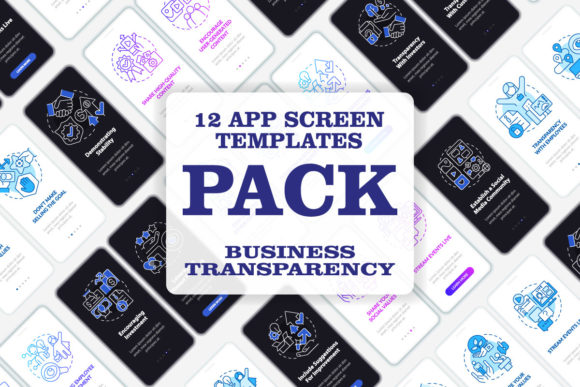
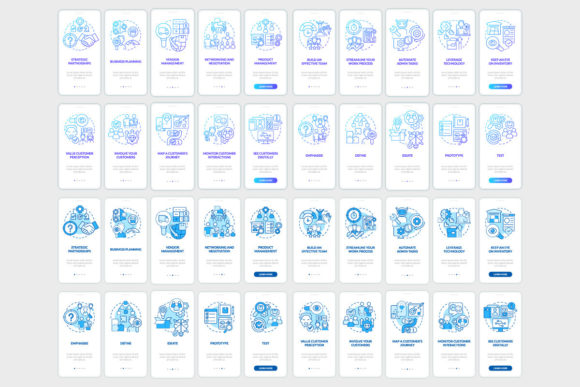
Imagine you need to design a mobile app that guides a new employee through your company’s processes, or introduces a client to your service offerings. You need screens that are not only visually appealing but logically structured, guiding the user step-by-step. This is where a specialized set of Business Development Mobile App Screens becomes a powerful starting point. They are pre-designed user interface (UI) templates focused specifically on onboarding, walkthroughs, and presenting linear concepts—think step-by-step tutorials, product introductions, or corporate onboarding sequences.
These collections, like the one described with Myriad Pro fonts and multiple file formats (EPS, SVG, PNG, JPEG, AI), are essentially a toolkit. They provide the visual framework—the screens, icons, and graphic instruction pages—so you don’t have to build every element from scratch. For anyone involved in bringing a digital product to life, this can shift the focus from foundational design to customization and content.
Why Different Creators Care About Pre-Built Screens
The value of a Business Development Mobile App Screens set isn’t universal; it changes dramatically based on who you are and what you’re trying to achieve. A freelance designer might see it as a time-saving asset for a client project, while a startup founder with no design background might view it as the essential visual blueprint for their app idea. The priorities shift: from creativity and flexibility for the experienced professional, to ease of use and reliability for the beginner.
For Beginners and Entrepreneurs Stepping Into Design
If you’re new to app design or building a business on a tight budget, these screens offer a critical head start. Your primary concern is likely presentation and speed. You need something that looks professional quickly, without requiring deep expertise in UX (User Experience) principles. A template set with clear linear concepts—pages that logically flow from one to the next—provides a ready-made structure. You can focus on filling in your specific content, your company’s story, and your product details into the pre-arranged containers. The inclusion of multiple file formats like PNG and JPEG means you can easily place and test these screens in simple prototyping tools.
For example, a small business owner developing an app to onboard new franchisees could use these screens as the visual backbone, ensuring the training feels cohesive and polished from day one.
For Professionals and Agencies: Efficiency and Customization
Design professionals, UI/UX specialists, and marketing agencies often evaluate these resources differently. While they possess the skill to create original designs, time is a commercial commodity. A well-crafted template set, especially one offering vector formats like EPS, SVG, and AI, is a foundation for rapid customization. The priority here is flexibility and quality. The use of a clean font like Myriad Pro indicates a certain aesthetic standard, which can be trusted and then altered. These screens become a starting component in a larger workflow, speeding up client deliverables for projects like corporate onboarding apps or investor pitch deck supplements.
Their long-term usefulness is tied to the quality of the underlying design system. Are the icons consistent? Is the spacing logical? Does the template accommodate different content lengths? These are the questions a professional will ask.
Creators, Educators, and Content Publishers
Bloggers, educators, and freelance creators might use these screens outside of a traditional app development context. The “brochure infographic templates” and “mobile app screen pages” mentioned can serve as high-quality visual assets for online courses, YouTube tutorials explaining business concepts, or enhanced digital publications. An educator creating a module on “Business Development Stages” could use these screens as illustrative slides to show a digital onboarding process. Here, the learning value and presentation quality are key. The fact that they are provided in scalable vector formats (SVG, AI) means they can be adapted for various digital mediums without loss of quality.
For a hobbyist interested in app design, such a collection offers a tangible learning tool—a real-world example of how a professional UI for a specific business function is constructed, which can be studied and deconstructed.
Identifying If This Toolkit Matches Your Needs
So, how do you decide if investing in a Business Development Mobile App Screens collection is right for your current project? Start by asking a few practical questions about your goals, skill level, and project type.
First, consider your project’s core purpose. Is it fundamentally about guiding someone through a linear process? If your app or digital content involves steps, stages, tutorials, or a sequential introduction, then a template focused on “walkthrough steps” and “graphic instructions” is highly relevant. If your project is more about social interaction, data dashboards, or e-commerce, this specific set might be less applicable.
Next, honestly assess your own resources. Do you have the time and design skill to build these screens from zero? If not, a template provides reliability. Do you need to hand off assets to a developer? The provision of formats like SVG and PNG is crucial for technical integration. Is your project commercial? The professional look of the template directly impacts perceived value.
Finally, think about scale and future use. A one-off project might justify using such a template for speed. However, if you’re building a suite of apps or regularly creating educational content, the long-term usefulness of having a consistent, reusable visual library becomes a significant benefit. Subscribing to a studio like BSD Studio, which offers new topics and discounts weekly, could be valuable if you regularly need fresh, high-quality design starting points across different business themes.
Practical Examples Across Reader Types
- A Marketer at a mid-sized company might use these screens to quickly mock up a client onboarding app for a sales pitch, demonstrating the proposed user journey without waiting for the full design team.
- A Freelance Graphic Designer could import the AI files into Adobe Illustrator, customize the colors and text to match a client’s brand, and deliver a complete set of app screen visuals in days, not weeks.
- A Business Educator could extract the individual PNG graphics of the “linear concepts” pages to use in an online lesson plan, visually breaking down complex business development phases.
- A Startup Founder with a prototype could use the JPEG screens in a presentation to potential investors, showing a clear, professional vision for the user’s first experience with their service.
In essence, Business Development Mobile App Screens are more than just pretty pictures; they are a functional solution that translates a common business need—guided introduction and education—into a ready-to-use digital format. Their relevance depends entirely on the viewer’s role: a lifeline for the novice, a productivity tool for the pro, and a creative asset for the content creator. By understanding the specific priorities of your own situation—whether it’s cost, quality, speed, or learning—you can determine if such a template set is the practical next step for your project.