A Presentation Template for Diverse Professional Needs
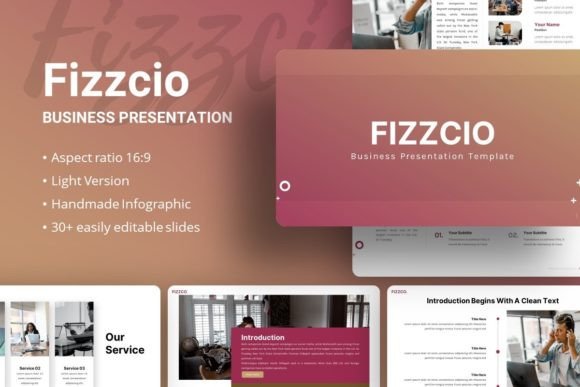
Modern communication demands clarity and visual impact, especially when presenting ideas to clients, stakeholders, or peers. For many professionals, creating such presentations from scratch is a time-consuming task that drains resources from core work. Presentation Template - Fizzcio is a pre-designed PowerPoint solution aimed directly at solving this problem. It is a structured set of slides intended to serve as a foundational framework for a wide array of presentation types, from corporate profiles to personal portfolios.
Core Characteristics and Design Philosophy
The template is built around a set of 35 distinct slides for each included design theme. This number provides a substantial library without overwhelming the user, offering enough variety to build a complete narrative without forcing repetitive slide reuse. The design is based on master slides, a fundamental PowerPoint feature that ensures consistency across fonts, colors, and layout elements. This technical foundation is crucial; it means that when you modify a master element, such as a header style, that change propagates throughout your entire presentation, maintaining visual coherence effortlessly.
A noted feature is the inclusion of handcrafted infographics. These are not simple clip-art but are designed to be pixel-perfect illustrations within the PowerPoint environment. In practical terms, this means they maintain sharpness when scaled and are constructed from editable vector shapes. For a user, the value is twofold: the infographics provide a professional starting point for data visualization, and because they are resizable and editable, they can be tailored to fit specific content without losing quality or requiring external graphic software.
Flexibility and Customization in Practice
The promise of "easy customizable contents" hinges on the template's structure. Elements like picture placeholders with drag-and-drop functionality streamline the process of inserting images. Instead of manually cropping and aligning a photograph, you can drop it into the placeholder, and the template handles the framing. This is a practical time-saver during the assembly phase. The included fonts, Inter and Karla, are modern, web-friendly sans-serif typefaces that convey a clean and contemporary aesthetic. Their use within the template is predefined, but as they are standard and freely available fonts, users can maintain typographic consistency even when adding new text boxes.
The files included—the PowerPoint .PPTX file, a documentation file, and vector icons—form a complete package. The documentation is often an overlooked asset. A well-written guide can explain the master slide structure, how to use the infographic components, and best practices for customization, significantly reducing the learning curve for those less familiar with PowerPoint's advanced features.
Evaluating Real-World Application and Audience Fit
The true measure of a template is not its feature list, but its performance in actual use. Presentation Template - Fizzcio positions itself as a multi-purpose tool. Its strength lies in its generality. A creative agency can use it for a client pitch deck, leveraging its clean layouts to showcase visual work. A startup founder can adapt it for a funding presentation, using the infographic slides to explain market data and business models. An educator or blogger might repurpose it for a webinar or online course, benefiting from its organized content flow.
For the entrepreneur or small business owner operating with limited design resources, this template provides immediate elevation. Starting with a professionally structured design avoids the common pitfall of presentations that look amateurish, which can undermine credibility. The time saved in layout design can be redirected to refining the actual message and content.
However, its generalist nature also implies a limitation. For projects requiring a highly specialized, industry-specific aesthetic—such as a medical research presentation with very particular data chart requirements or a luxury brand deck demanding a unique artistic flair—the template would serve primarily as a basic structure, requiring significant customization. It is a foundation, not a finished bespoke product.
Quality Considerations and Long-Term Value
Quality in a presentation template is judged by its technical execution and longevity. The use of master slides and editable vector graphics speaks to good technical execution. These features prevent the common frustration of templates that break or become misaligned when users try to modify them. The Presentation Template - Fizzcio appears designed for modification, not just consumption.
Long-term value is derived from reusability and adaptability. A user who masters this template's structure can likely repurpose it for multiple projects over time, creating a consistent visual identity for their communications. The inclusion of placeholder images from sources like Unsplash and Pixabay in the demo is a note of practicality—it reminds users that high-quality stock imagery is readily available to populate the template, though wisely, the template files themselves do not include these demo images to keep the package size manageable and avoid licensing issues.
Practical Recommendations for Potential Users
If your workflow involves creating PowerPoint presentations regularly, and you lack a dedicated graphic designer, this template is a sensible investment. Before using it, spend time reviewing the documentation and understanding the master slides. This upfront investment of ten minutes will prevent haphazard changes that disrupt the template's cohesion.
When customizing, stick to the provided fonts (Inter and Karla) whenever possible to maintain the designed rhythm. Use the picture placeholders as intended—they are there to ensure images are proportioned correctly. For the infographics, do not just change the data labels; consider if the chart type itself (e.g., a bar chart versus a pie chart) is the best match for your data, and feel free to alter the graphic using PowerPoint's native formatting tools since they are editable.
It is important to note that the template is a starting point. Its effectiveness will ultimately depend on the content you feed into it. A powerful, well-structured argument placed onto a clear, professional visual framework will always outperform a weak argument on the most beautiful slides. Presentation Template - Fizzcio provides the framework, reliably and efficiently, leaving you to focus on the argument.
For professionals across fields—from marketers to freelancers—who need to produce clear, credible presentations without becoming part-time designers, this template offers a pragmatic solution. It balances sufficient structure to guide the process with enough flexibility to allow for personalization, making it a versatile asset in a modern professional toolkit.