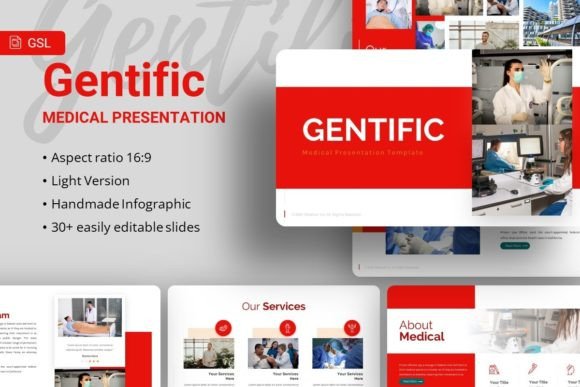
Google Slides Gentific: A Flexible Foundation for Professional Presentations
In a landscape saturated with presentation templates, finding one that balances professional polish with genuine adaptability is a rare win. The Google Slides Gentific template stands out not merely as a collection of slides, but as a structured design system. It provides a clean, modern aesthetic rooted in scientific and data-driven visual cues, yet its core utility lies in its remarkable flexibility. This isn't a template confined to lab reports or academic conferences. Instead, Gentific offers a coherent visual language that can be expertly translated for creative agencies, startup pitch decks, corporate profiles, and personal portfolios.
Beyond the Lab: Interpreting a Scientific Visual Language
The “Gentific” name and its initial aesthetic—featuring crisp typography, structured layouts, and pixel-perfect illustrations—suggest precision and clarity. This is a powerful starting point for any professional communication. The template’s inherent style communicates authority, organization, and trustworthiness. For a creative professional, this is an opportunity to borrow that credibility and apply it to entirely different fields. Imagine a marketing agency using these clean lines and data-centric infographics to present a brand analysis, making creative recommendations feel like empirical conclusions. A freelance photographer could use the structured grids to showcase a portfolio, lending a curated, museum-like seriousness to their artistic work.
The key is to see the template's elements as symbolic rather than literal. The handcrafted infographics are not just for charts; they can be repurposed as visual guides for a service process, a timeline of company milestones, or a breakdown of project phases. The resizable and editable illustrations become modular design components. A geometric shape might frame a product shot in a startup pitch, while a line-based diagram could elegantly map out a user journey for a software demo.
Adapting Gentific for Your Specific Audience and Goals
The true test of a versatile template is how it performs across different audiences. Gentific’s master slide foundation ensures consistency, which is vital for maintaining professional cohesion regardless of the viewer.
For a corporate or business audience expecting rigor, lean into the template’s innate structure. Use the provided slide formats to build a narrative with clear problem-statements, methodology (your approach), data (your results or metrics), and conclusions (your recommendations). The fonts, Karla and Raleway, offer a blend of geometric simplicity and elegant readability that reinforces a no-nonsense, yet sophisticated, tone.
When targeting creative clients or investors for a startup, you need to inject energy while retaining credibility. Here, Gentific’s customizable contents and picture placeholders are your best tools. Swap in vibrant, high-quality images from Unsplash or Pexels that reflect your brand’s dynamism. Use the drag-and-drop functionality to create compelling visual contrasts—placing a bold product image against a minimalist, science-inspired background can make your innovation feel both groundbreaking and substantiated.
Educators and hobbyists presenting to a community or peer group can use Gentific to elevate their content. The clear hierarchy of headings and the organized layout help transform a complex hobby tutorial or an educational lecture into an engaging, easy-to-follow experience. It prevents visual clutter, keeping the audience focused on the core ideas.
A Practical Toolkit for Originality and Efficiency
With 35 slides per template, the Gentific package provides a comprehensive starting canvas. The risk with such a complete set is the temptation to use every slide, potentially creating a generic, template-feeling presentation. The solution is selective customization and strategic editing.
Begin by auditing the slide master. Understand which layouts align with your key message points—title slides, content splits, full-image backgrounds, dedicated infographic pages. Then, curate and sequence only the ones that serve your story. A powerful company profile might only need 15 of those 35 slides. This selective approach forces you to think about narrative flow, making the output more original and audience-friendly.
The included vector icons and resizable graphics are assets for building visual metaphors. Instead of using a standard “team” icon, consider combining simple geometric shapes from the template’s own library to create a unique ensemble symbol that represents your specific team culture. This level of customization, while staying within the template’s design ecosystem, maintains consistency and breeds originality. The documentation file is crucial here; it guides you through the editing process without locking you into preset ideas.
Maintaining Clarity and Effectiveness Across Platforms
A presentation created in Google Slides often lives beyond a single live talk. It might be exported for a website, printed as a handout, or shared digitally for asynchronous viewing. Gentific’s design, with its strong contrast and balanced typography, tends to be resilient across these formats. For clear results:
- Prioritize legibility: When customizing text, respect the established font pairing and size hierarchy. Karla for body text ensures readability on screens and in print.
- Optimize images for context: While the demo images aren’t included, the placeholder system reminds you to source images that are high-resolution for presentations but also web-optimized if you plan to share the slides online.
- Embrace the monochrome base: The template’s default color scheme provides a calm, neutral canvas. Adding a single, strategic accent color—your brand color—across titles, key icons, or charts can create powerful visual focus without deviating into chaotic, ineffective design.
This disciplined approach ensures your adapted presentation feels professional, cohesive, and purpose-built, whether it’s projected in a boardroom or viewed on a smartphone.
From Template to Unique Creative Asset
The final step in leveraging Google Slides Gentific is to view it not as a finished product, but as your project’s first draft. Its features—the master slides, editable vectors, and easy-to-modify layouts—are tools for rapid prototyping. You can quickly assemble a solid, credible draft, then spend your creative energy on refining the message and injecting your unique voice.
For the marketer, that means populating the data-driven slides with compelling customer stories. For the entrepreneur, it means using the infographic slides to visually simplify a complex business model. For the portfolio creator, it means using the clean, gallery-like slides to frame each work with thoughtful commentary. The template handles the foundational design burden, freeing you to focus on content, strategy, and audience connection.
In essence, Gentific succeeds by offering a strong, silent framework. It establishes rules of clarity and order, then generously provides the means to bend those rules to suit your creative or professional vision. The result is a presentation that carries the weight of professional design while speaking in your authentic voice, achieving that crucial balance between inspiration and practical guidance.