Simplify Complex Data with RGB Information Industry Icons
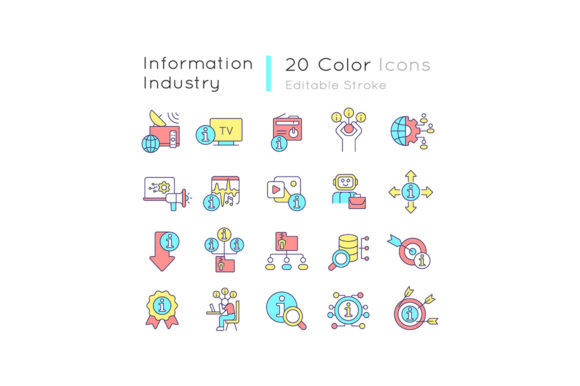
Working with information today means dealing with abstract concepts: data flows, knowledge management, cloud systems. It’s challenging to make these ideas visually clear. This is where a specialized icon set like the Information Industry RGB Color Icons Set becomes a practical tool. It’s a collection of 20 simple, filled-line drawings, each designed in vibrant RGB color, focusing squarely on themes like data management, knowledge overload, and digital connectivity.
What This Icon Set Actually Is
Think of it as a visual vocabulary for the information age. The set includes isolated vector illustrations for concepts such as databases, analytics, security, and networks. They are provided in multiple file formats—EPS, SVG, PNG, JPEG, and AI—making them editable and adaptable for different software and uses. The consistent use of the Quicksand-Light font in labeling, combined with the editable stroke of the icons, offers a clean, modern aesthetic. It’s more than just graphics; it's a cohesive design system aimed at explaining, presenting, and simplifying complex topics.
Why Different People See Different Value
A marketer and a software engineer might look at the same icon of a "data pipeline" and think of completely different applications. The value of this resource isn’t universal; it’s deeply personal to your role, your projects, and your immediate needs.
For Creators and Freelancers: Speed and Flexibility
If you're designing a client’s brochure, a mobile app screen, or an infographic, time is often your scarcest resource. Having a ready-made set where icons are already themed, colored, and provided in vector formats (EPS, SVG, AI) means you can modify them quickly without starting from scratch. Your priority is creative flexibility and professional presentation. You might take the "knowledge overload" icon, adjust its stroke in Illustrator, and drop it into a presentation about digital mindfulness for a corporate workshop. The commercial value here is clear: it accelerates your workflow and elevates the final product's polish.
For Educators and Publishers: Clarity and Learning Value
When explaining data privacy to students or illustrating information architecture in an e-book, abstract text alone often fails. These icons serve as visual anchors. An educator might use the isolated vector illustrations in a slide deck to break down the components of a cloud storage system, making the lesson more digestible. The priority shifts to educational clarity and the set’s ability to translate jargon into understandable imagery. The PNG and JPEG files are perfect for quick insertion into digital learning materials or blog posts.
For Small Business Owners and Entrepreneurs: Cost and Ease
You may not have a design team, but you need to create a professional-looking internal report, a investor pitch deck, or a simple website section about your data services. Evaluating this set, you’d care most about ease of use and long-term usefulness. The included formats mean you can use the PNGs in basic software like PowerPoint or Canva immediately. The fact that it's a collection, not a single icon, offers a cost-effective solution for various needs over time—from social media graphics to printed flyers.
For Beginners and Hobbyists: A Gateway to Better Design
If you’re starting a blog or a personal project and feel overwhelmed by design, a themed set like this provides a safe starting point. The consistency in style and color gives you a coherent look without needing advanced skills. You can focus on your content, using the icons to highlight sections about data management or tech reviews. Your evaluation is about learning value and simplicity. The zip file with organized formats is less intimidating than sourcing individual, mismatched icons from across the web.
Practical Examples in Action
Consider a freelance marketer creating an email campaign for a SaaS company. She uses the "data management" and "secure server" icons from the Information Industry RGB Color Icons Set as visual cues in her layout, reinforcing the message of reliability. She edits the SVG file slightly to match the client’s brand accent color, a task made possible by the editable stroke.
An academic researcher publishing a paper on information overload might place the relevant icon from the set in a graphical abstract to summarize the study’s core theme quickly, utilizing the JPEG for easy submission to journal portals.
A small business owner, launching a local tech support service, incorporates several icons into his website’s "Our Services" page. The simple filled line drawings help visually categorize services like "data backup" and "network setup," making the page more engaging than text alone.
Does This Set Match Your Goals?
To decide if this resource is right for you, ask a few straightforward questions. Are you regularly needing to visualize topics related to data, knowledge, IT, or digital systems? Do you work across different mediums—digital, print, video—that require multiple file formats? Is having a consistent, modern visual style important for your project’s credibility?
If you answered yes, then a specialized, multi-format set like this offers tangible benefits. If your needs are highly niche or you require hundreds of varied icons, a larger, more general library might be better. But for those focused on the information industry theme, this collection removes the friction of searching and styling disparate icons, providing a reliable, quality foundation.
The broader offering from BSD Studio, which includes brochure infographic templates and mobile app screens, suggests a design philosophy geared towards practicality. For many, subscribing for new topics and discounts is a way to maintain a fresh toolkit. Ultimately, the Information Industry RGB Color Icons Set is about empowerment—giving different people, with different skill levels and intents, the right visual tools to communicate complex ideas with simplicity and impact.